Troubleshooting
M-Pesa STK Push Not Working
Troubleshoot an M-Pesa STK Push that does not reach the customer phone or does not complete in AiWeapX POS.
On this page1. Check internet and phone number2. Confirm M-Pesa settings3. Send one new request4. Wait for payment confirmation
1. Check internet and phone number
Confirm the POS has internet access and the customer phone number is correct.
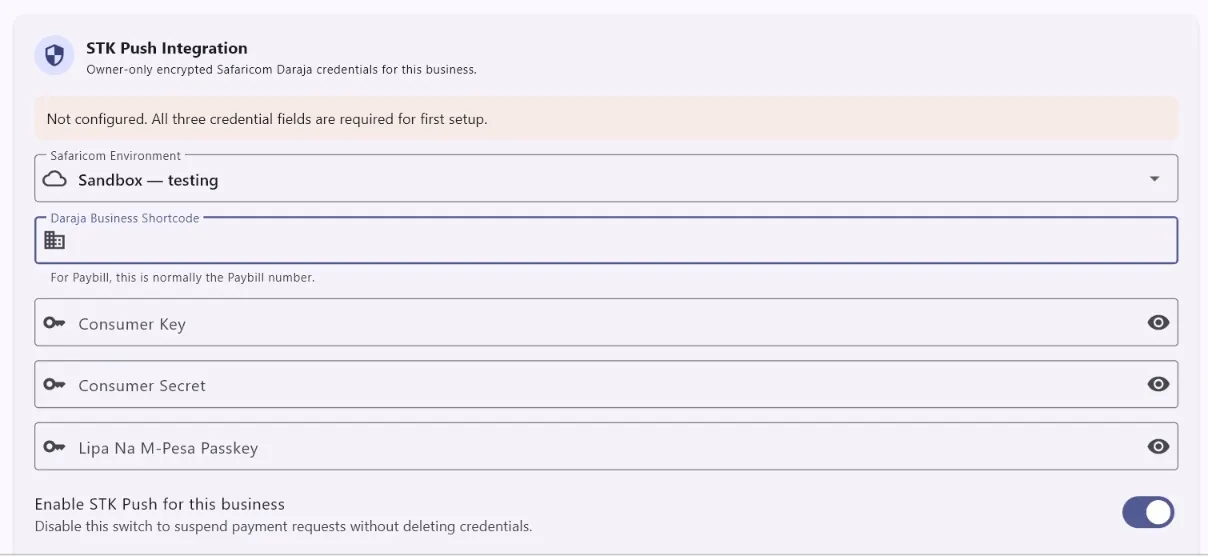
2. Confirm M-Pesa settings
Open Settings → M-Pesa Integration and confirm the saved business integration details are correct.
3. Send one new request
Return to checkout, choose M-Pesa, confirm the amount and phone number, then send the STK Push once.
4. Wait for payment confirmation
Ask the customer to complete the prompt on their phone. Do not mark the sale paid until AiWeapX confirms the payment status.
Need more help? Use the Help search above or contact AiWeapX support. Avoid repeating payments or transactions until you have confirmed the previous attempt did not complete.