How-to guide
How to Set Up M-Pesa STK Push
Configure AiWeapX POS M-Pesa integration for customer checkout payments.
1. Open M-Pesa Integration
Go to Settings → M-Pesa Integration.
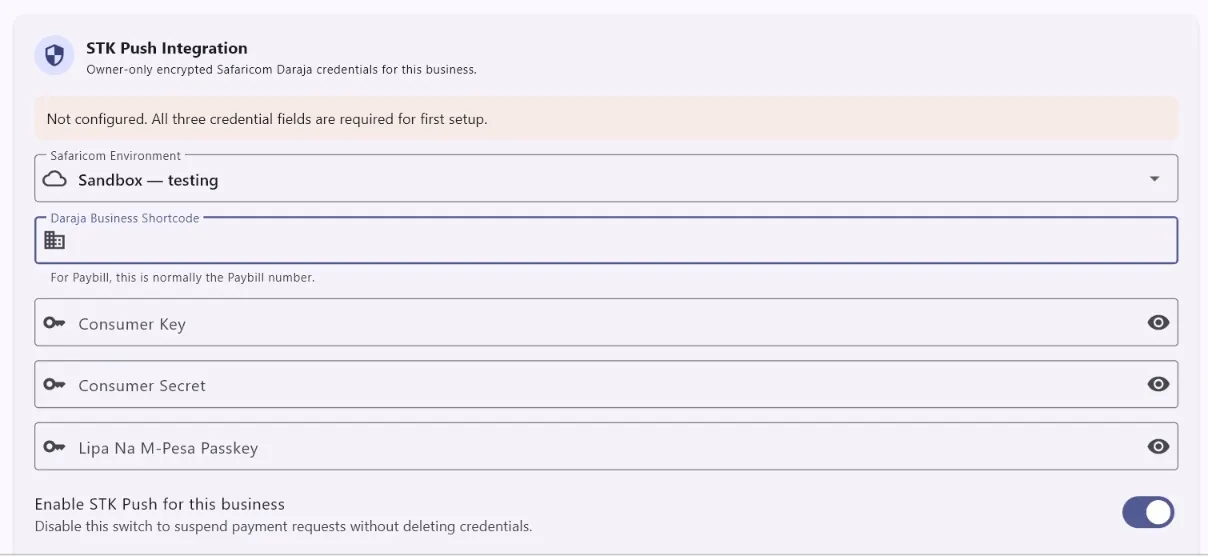
2. Enter integration details
Enter the required M-Pesa business/API configuration supplied for your setup.
3. Save
Save the configuration.
4. Test at checkout
Use a controlled checkout to confirm an STK Push can be initiated and payment status is confirmed.
Need more help? Use the Help search above or contact AiWeapX support. Avoid repeating payments or transactions until you have confirmed the previous attempt did not complete.